7.2 Javascript Control Flow
Control Flow
Section titled “Control Flow”By default, a web browser interprets Javascript code line by line, until it reaches the end. You already learned to control the flow of your program using a for loop in Chapter 6, repeating specific blocks of code as many times as needed. Similarly, a conditional statement allows you to change which code will run based on the state of information in your program. As the second example illustrates, when a conditional statement is evaluated, it either runs the statement block if the condition is true, or skips to the end when the condition is false.
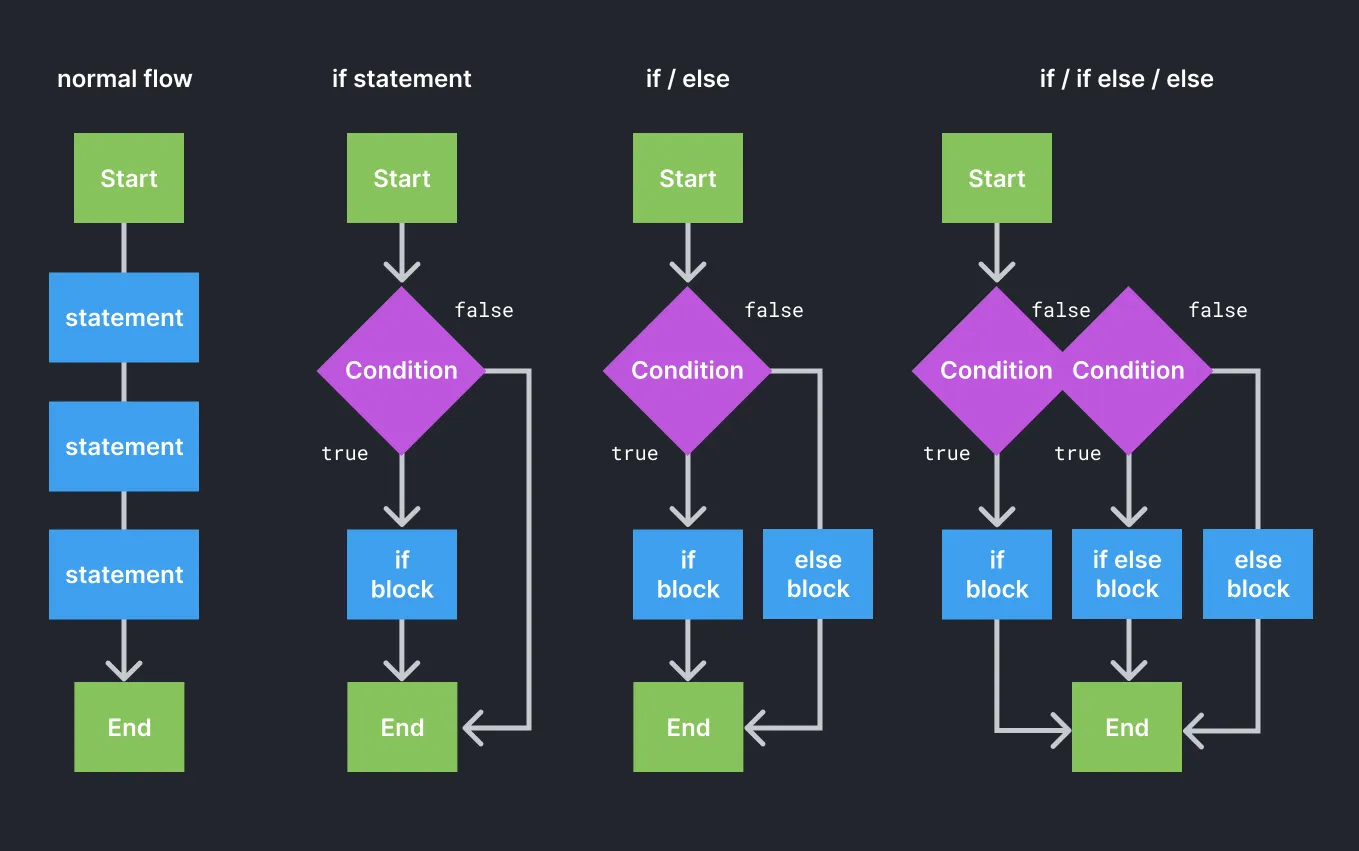 This diagram demonstrates the normal flow of javascript code, as well as different scenarios using if statements.
To create the branching structures you see in the figure you can use an if statement. As the name suggests, if the expression is true, the following statement block (inside the curly braces) will be executed. Otherwise, if the condition is false, unless you also add an if/else or else block, the code will continue the normal flow.
This figure shows how an if statement is written. At its core is an expression that returns a boolean value (either true or false) using a comparison operator.
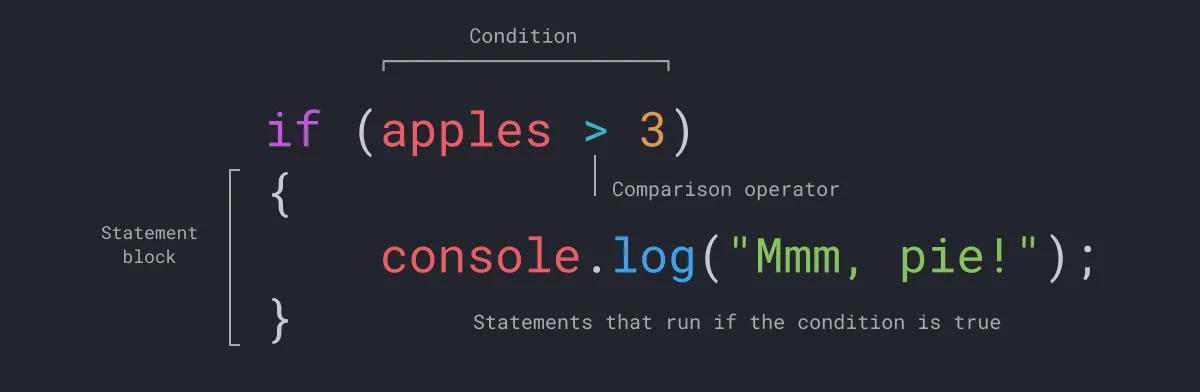 The anatomy of an if statement.
Comparison Operators
Section titled “Comparison Operators”Expressions using comparison operators
| Expression | Returns | Notes |
|---|---|---|
1 == 1 | true | The double == returns true if the values are equal and false if not. |
1 == 2 | false | |
1 != 2 | true | The != operator returns true if the expression is false. |
1 == "1" | true | Javascript is a weakly-typed language; it will try to convert the value on the left to a string and then compare to find them equal. |
1 === "1" | false | Javascript’s special triple === evaluates the condition of both the value and the type of data being compared. |
3 > 1 | true | Greater than and less than operators also return a Boolean value |
As you noticed in the figures, you can also test other conditions using an if/else statement. And finally, you can use an else statement to define a default condition. You can also combine conditional expressions using logical operators ( and &&, or ||, not !) to combine the results of the expressions and account for more than one variable.
Logical Operators
Section titled “Logical Operators”Expressions using logical operators
| Expression | Returns | Notes |
|---|---|---|
(1 < 2 && 3 > 4) | false | Use && (“and”) to test if both expressions are true |
| `(1 < 2 | 3 > 4)` | |
!true | false | Use ! (“not equal”) to test if the expression is not true |
!(1 > 2) | true |
Now we will apply what you’ve learned about control flow by typing the following if statement in the Chrome Console. Open a new browser window and press Command+Option+J to access the Console. This code snippet evaluates more than one condition in an if, if/else, and else statement using comparison and logical operators. Notice how we use a comma to separate multiple variable declarations. What do you think this will output? Test your answer in the console.
let apples = 2,    blueberries = 4;
if (apples >= 2 && blueberries >= 4) {  console.log("we can make fruit salad")} else if (apples > 3 || blueberries > 2) {  console.log("we can make pie!")} else {  console.log("we need more fruit")}